
Imagine two applications on the same machine. Each reads a file, processes its contents and needs processor time. Neither should have to understand the storage controller, decide when the other application may run, or trust the other with its memory.
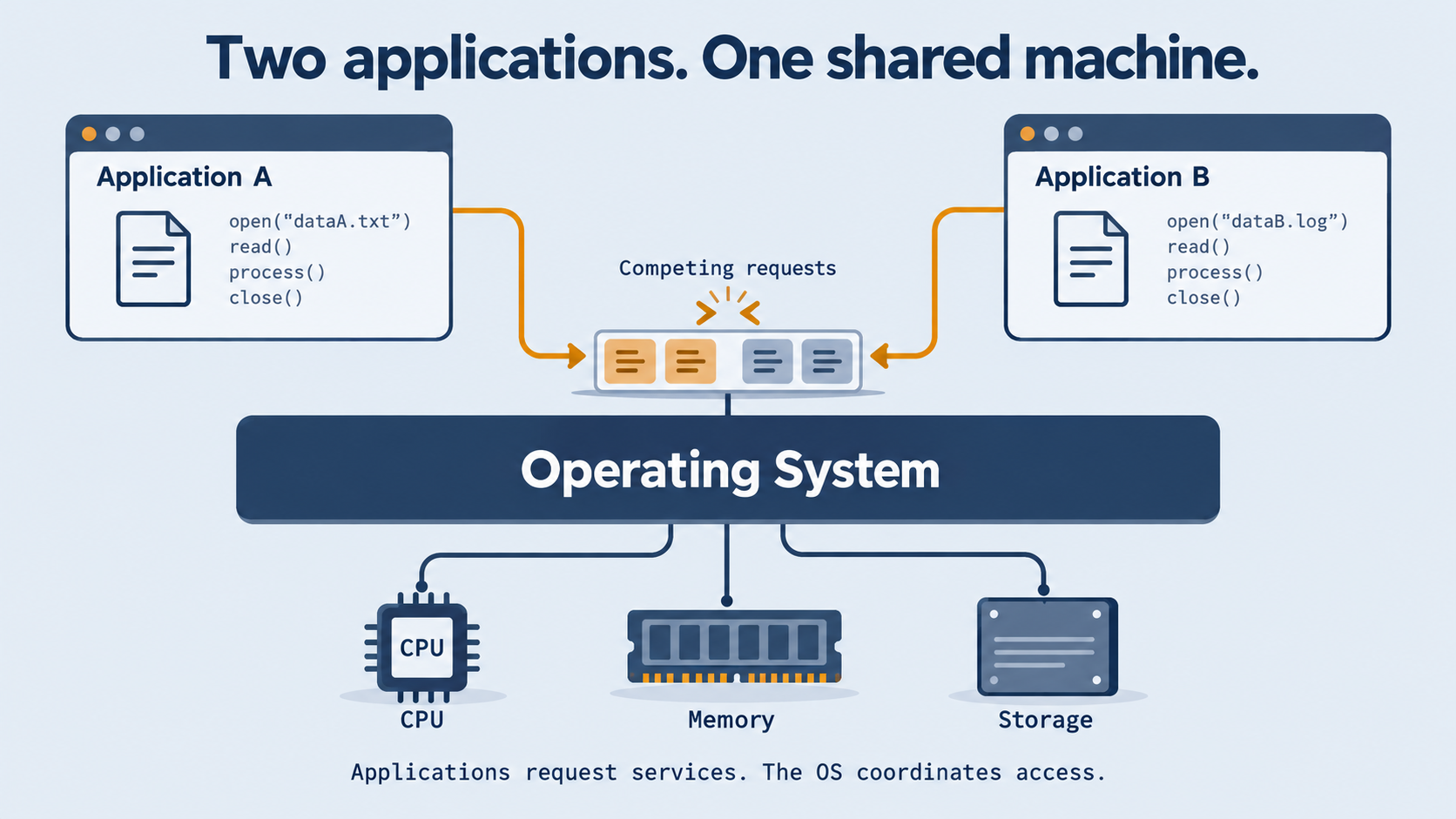
An operating system provides the services and controlled access to resources that make this arrangement possible. It gives programs useful abstractions, decides how resources are shared and enforces boundaries around their use. The important distinction is not simply software versus hardware: it is requesting a service versus controlling the resource that provides it.
Why operating systems appeared
Early computing made the cost of idle hardware painfully visible. A machine might run one job at a time, with an operator organising the work. Common routines saved programmers from repeatedly writing low-level input/output code. Batch processing organised jobs into groups rather than giving each user an interactive session.
Automating the handover between jobs reduced the need for manual intervention. But running jobs one after another still left an opportunity unused: while one program waited for a slow device, the processor could be doing useful work for another.
Multiprogramming addressed that problem by keeping several programs available and switching between them. Time sharing addressed a related but different need: people wanted to interact with a machine and receive reasonably prompt responses, rather than wait through a long batch-and-debug cycle.
These are recurring design pressures, not a universal sequence that every computer followed. They also explain why an OS needed more than reusable routines. Once several programs occupied one machine, someone had to decide who could run, what each could access and how to stop one program damaging another.
What an operating system actually does
Return to our two file-reading applications. A useful way to understand their OS is through three jobs: abstract, share and protect.
To abstract is to offer a usable model instead of exposing every hardware detail. An application works with a running process, a view of memory and named files, rather than independently managing processor state, physical memory locations and storage blocks. A process is a running instance of a program, together with the state needed to execute it.
To share is to coordinate finite resources. Both applications need processor time and memory; their file requests may compete for the same storage device. The OS keeps track of their execution and mediates those requests instead of leaving them to fight over hardware directly.
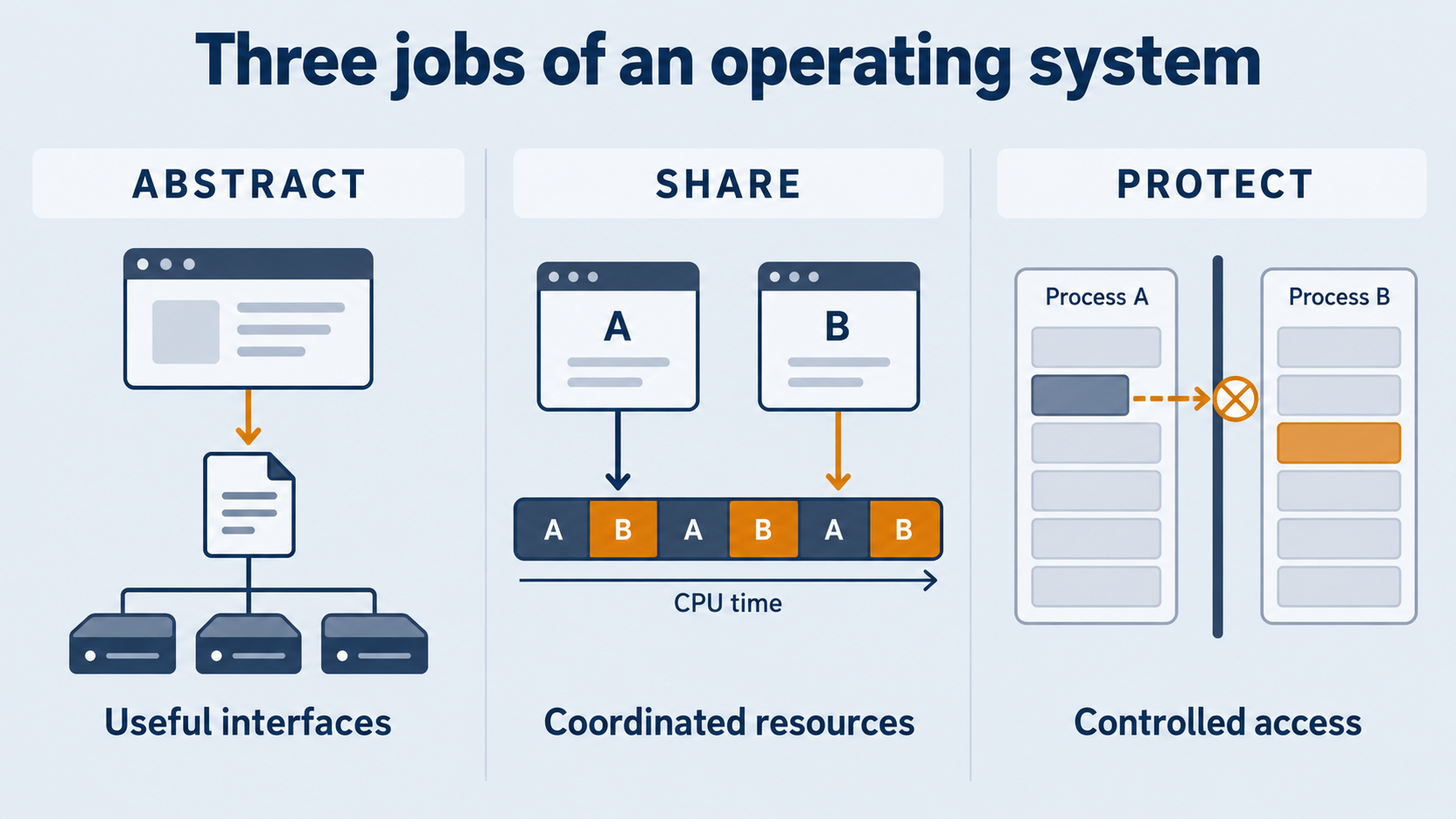
To protect is to constrain access. A request to open a file is not permission to inspect the entire disk. A program's ability to use memory is not permission to overwrite another program. Protection is central to making sharing useful, though it is not a promise of perfect isolation or fault-free software.
Execution, memory management, files, device access and permissions are therefore connected responsibilities, not an arbitrary list of features. The abstractions are useful because the system also has mechanisms to enforce them.
The kernel: the core, not the whole system
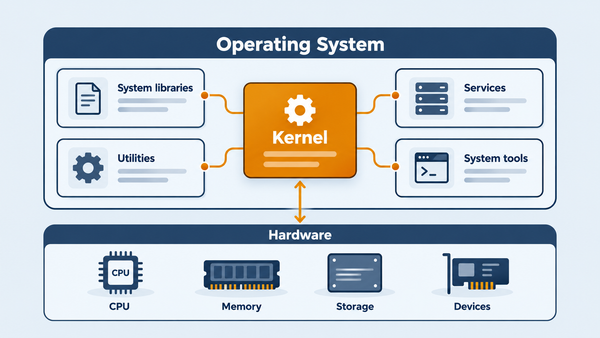
The kernel is the privileged core responsible for fundamental execution, resource arbitration and protection mechanisms. On the protected systems considered here, applications cannot simply take over those mechanisms: processor privilege levels and memory protection help enforce the boundary.
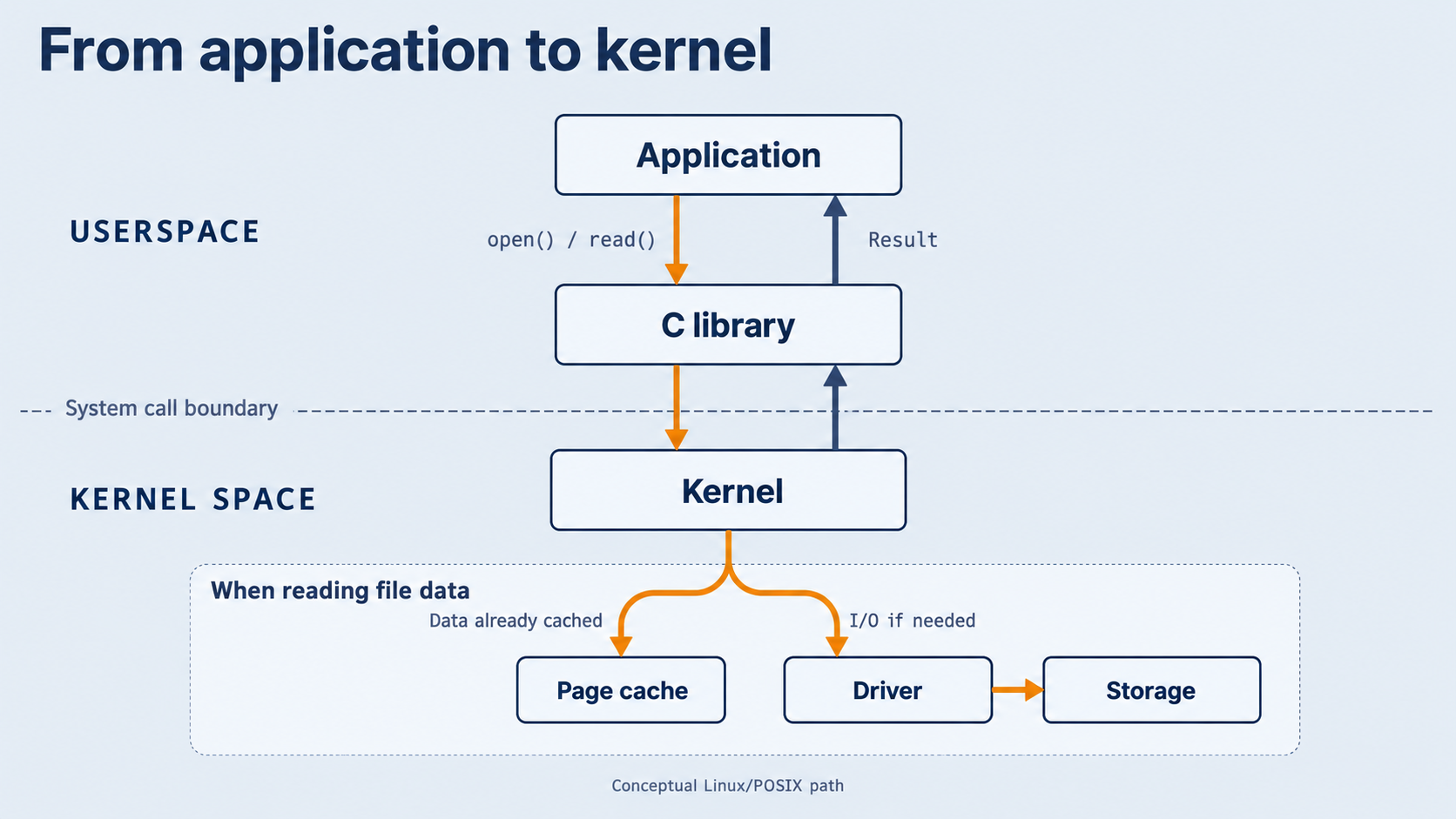
In our Linux example, the applications and their ordinary library code run in userspace. The kernel executes privileged code in kernel space. These terms describe an architectural boundary, not two different computers, and user mode does not mean “software written by a human user”.
The complete operating environment is broader than the kernel. It also includes libraries, system services and tools through which people and applications use the machine. A shell accepts commands; a graphical interface offers another way to interact. Neither is the kernel, and neither alone explains how the machine shares its resources.
An OS is not just its kernel, and a user interface is not the OS's resource-control mechanism. The boundary of what people call the complete “operating system” varies with context; identifying the kernel explicitly avoids that ambiguity. The Linux-oriented arrangement here should not be read as a universal layout for every OS.
How applications ask the kernel for help
Follow one application opening and reading a file. The example uses a Linux/POSIX-style C interface; it is a conceptual route, not a trace from a tested program or a specification of a particular Linux ABI.
- The application calls a library interface. It requests an open operation through
open()in the C library, commonly called libc. If successful, it receives a file descriptor: an integer handle it can use for subsequent operations on that open file. - The library arranges a system call. Its wrapper prepares the request according to the platform's calling convention, including the operation identifier and arguments. A dedicated processor instruction transfers control to a defined kernel entry point with the necessary privilege change. This is not an ordinary function call into freely accessible kernel code.
- The kernel handles the request. For the open operation, file-system code resolves the path and checks access before returning a descriptor or reporting failure. The application can then request data through
read(), supplying that descriptor, a destination buffer and a maximum byte count. - The result returns through the library to the application. For a successful read, the application receives a byte count and the data in its buffer. It must still handle the result, including the possibility that the end of the file has been reached or an operation has failed.
The route is therefore application → library API → system call → kernel → result back through the library. An API is the interface the program calls; the system call is the controlled request across the kernel boundary. The spelling of a library function does not guarantee a one-to-one match with a particular kernel operation. This explanation deliberately leaves the exact wrapper-to-ABI mapping unspecified.
The kernel need not fetch data from a physical disk for every read. File contents and metadata may already be cached in memory. If storage I/O is needed, the file-system path ultimately relies on device-specific driver code to communicate with the device. Opening a file, reading its bytes and performing physical I/O are related operations, not interchangeable descriptions.
Two distinctions prevent common misunderstandings. First, a library call does not necessarily make a system call. Libraries can do work within the application's address space; the memory-allocation library, for example, manages space there and uses kernel services when it needs underlying memory support.
Second, entering the kernel does not automatically switch to another process. A system call changes the execution mode and transfers control to kernel code. The kernel may return to the same process. If a request must wait, it may instead arrange for another process to run. A process switch is a separate scheduling action, not the definition of a system call.
Sharing one machine between many programs
Processor time: interleave work, or run it in parallel
Suppose the first application is waiting for file data while the second has bytes ready to process. The OS can let the second run instead of leaving the processor idle. Its scheduler decides what runs next; a context switch saves the state needed to resume one process and restores the state of another.
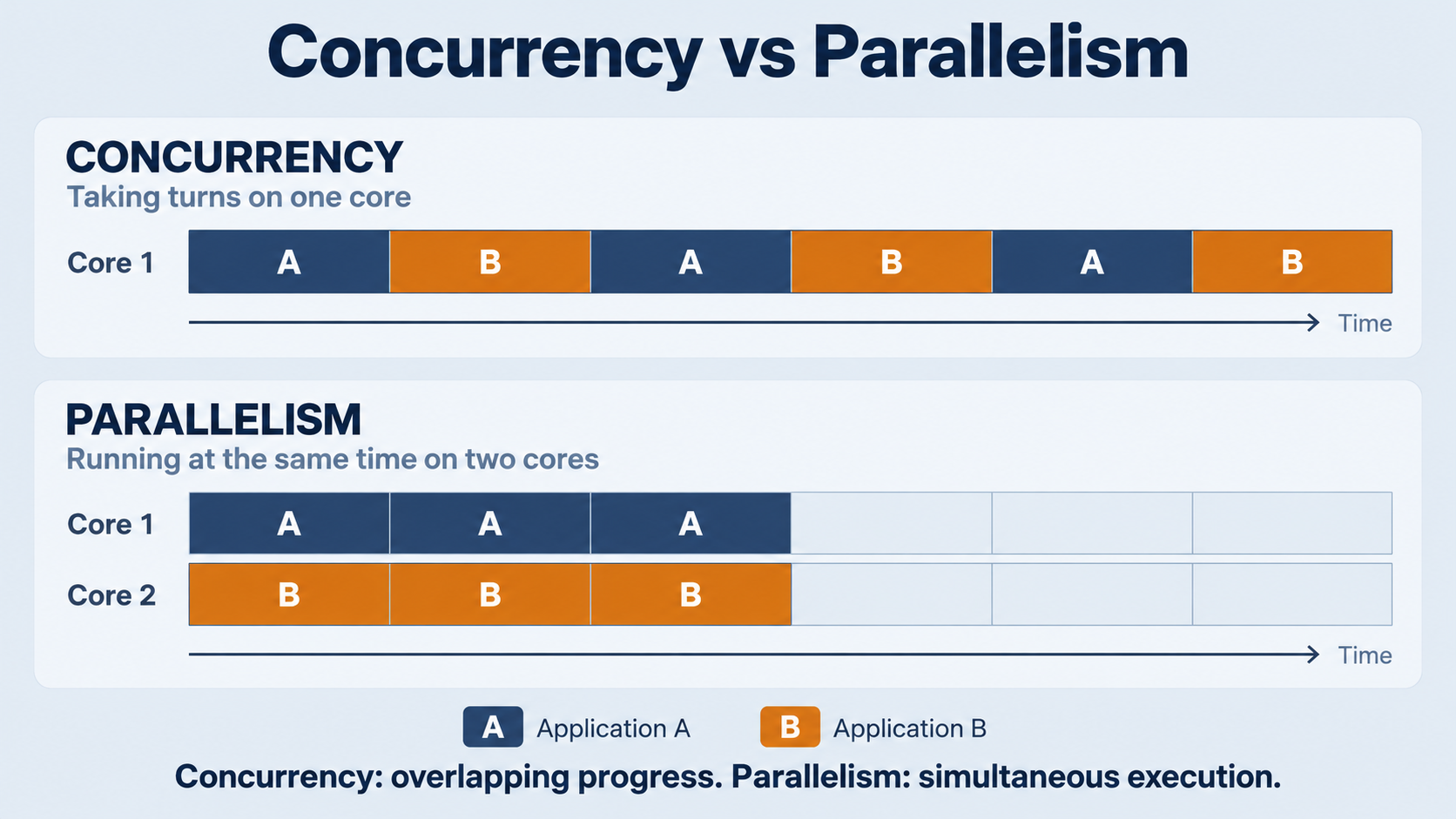
The system also needs a way to regain control when an application does not voluntarily yield. A timer interrupt provides such an opportunity: hardware transfers control to an OS handler, which can make a scheduling decision. The scheduler need not change processes every time it gains control.
On a single execution core, the two applications can make progress by taking turns. That is concurrency: their work overlaps in time without both executing instructions at the same instant. With multiple cores, work can also execute simultaneously — parallelism. Sharing does not imply that either program has a processor permanently to itself, or that each receives an equal share.
Memory: separate views, controlled access
Both applications must retain their data while taking turns on the processor. An address space gives each process its own view of memory. In a protected virtual-memory system, the OS and hardware translate that view to physical memory and constrain which locations it may access.
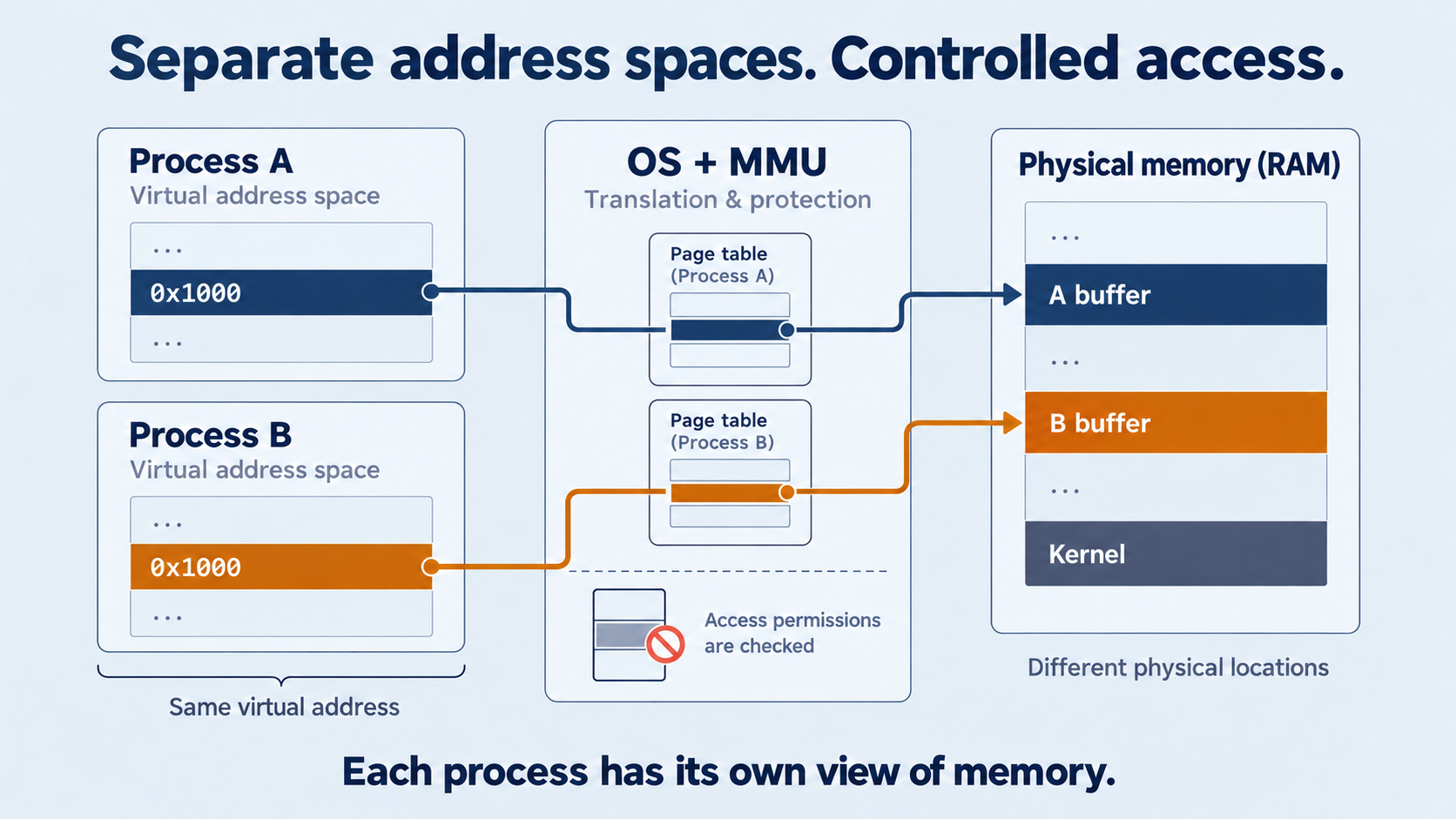
The same virtual address in two processes need not refer to the same physical storage. Our two applications can therefore use their own buffers without negotiating every address with each other. Memory protection aims to prevent an invalid access in one process from becoming an unrestricted write into the other process or the kernel.
This is a controlled abstraction, not unlimited memory and not perfect isolation. It depends on the hardware and OS mechanisms actually provided by the target system.
Storage and devices: mediate requests, not just ownership
The applications may also compete for device bandwidth and cache space. The OS presents file interfaces, tracks open files and coordinates lower-level I/O rather than giving both programs unrestricted command of the storage device.
Yet mediation cannot make a finite device serve unlimited demand. One application's activity may delay the other's requests. Cached reads may avoid storage traffic, but the cache itself consumes memory. Sharing therefore involves policy and trade-offs as well as mechanisms: who waits, which resources remain available and which goals take priority?
The practical lesson is that shared does not mean equal, unrestricted or free of contention.
Where middleware fits
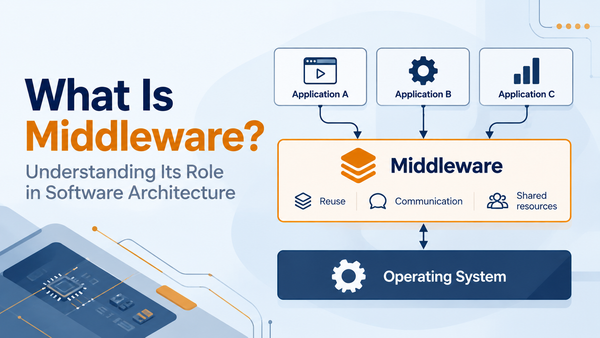
Here, middleware means software layers that provide higher-level application services or integration between applications and platforms. Application messaging is one example: software can offer a message-oriented interface rather than requiring each application to construct that service from lower-level communication mechanisms.
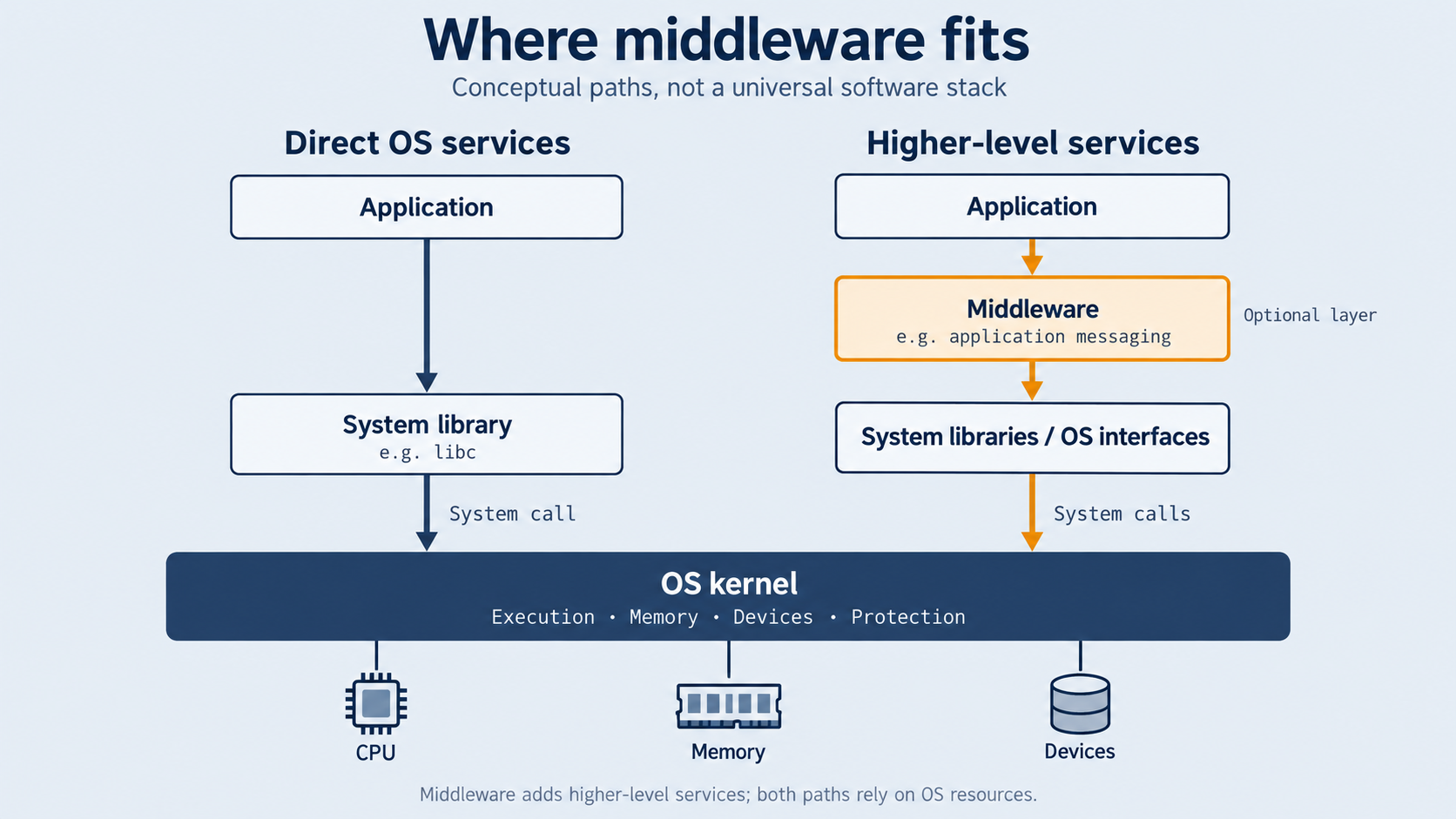
This describes a role, not a mandatory component of every operating system. It is useful to distinguish three things: a system library offers callable routines and interfaces; a system service performs work on behalf of other software; middleware supplies a higher-level service or integration layer for applications. These categories can overlap in implementation — middleware may include libraries and service processes — but they are not synonyms.
Our file-reading applications do not need to pass through middleware on their way to a system call. They can use libc and kernel services directly. Adding middleware can change the interface an application uses; it does not remove the underlying need for processor time, memory, device access and protection.
What to remember when building a system
An operating system saves each application from having to manage the whole machine. Its abstractions make resources usable; its arbitration makes sharing possible; its protection mechanisms constrain interference.
It does not remove the application's responsibilities. Our two applications must still interpret their data, handle failures and account for the resources their work consumes. Receiving a file descriptor is not a guarantee of instantaneous reads, just as receiving processor time is not a guarantee of a completion deadline.
For an embedded design, use these distinctions as questions rather than assuming a desktop arrangement: which services are needed, which protection mechanisms exist on the target, and what response-time and resource constraints must the complete system meet? The presence of an OS alone is not the answer to those design questions.
The key idea is simple: applications ask for services; the operating system controls how the underlying resources are used. That separation is what lets independent programs share a machine without each having to run it.
Sources and further reading
- Remzi H. Arpaci-Dusseau and Andrea C. Arpaci-Dusseau, Operating Systems: Three Easy Pieces, Arpaci-Dusseau Books. Selected passages consulted from a local copy: chapter 2 (resource management, persistence, protection and history); chapter 6, sections 6.1–6.3 (protected execution, system calls and switching); chapter 13, sections 13.1–13.4 (time sharing and address spaces); section 14.5 (library allocation and OS support); sections 39.3–39.4 (file interfaces); sections 40.6–40.7 (read paths and caching). Official book site.