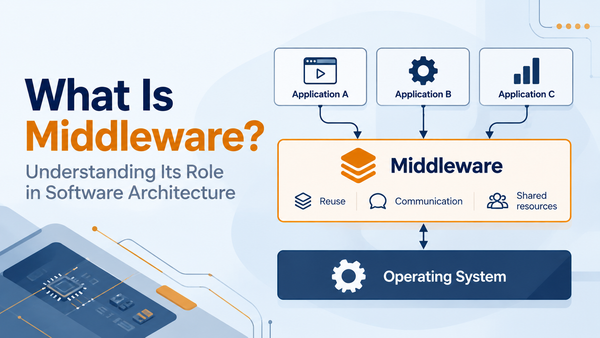

In our previous article, What Is an Operating System?, we explored how an operating system manages computer resources and provides the environment in which applications can run.
But which part of the operating system actually performs these essential tasks?
At the heart of most operating systems is a component called the kernel. It works behind the scenes, managing the computer's resources and helping applications interact with hardware.
Although users rarely interact with it directly, the kernel plays a fundamental role in how a computer operates.
So, what exactly is a kernel, and why do operating systems need one?
What Is a Kernel?
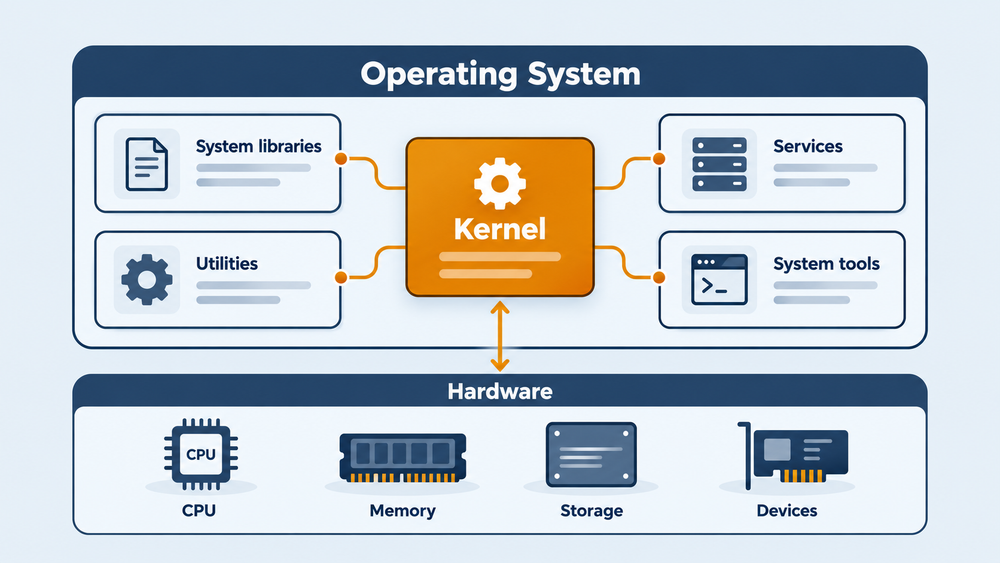
The kernel is the core component of an operating system. Its main responsibility is to manage the computer's resources and provide the essential services that applications need to run.
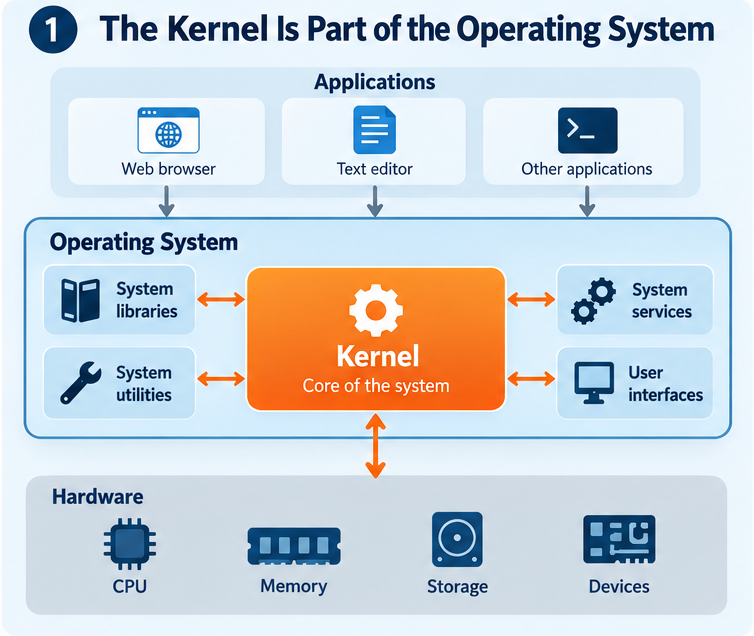
To understand its place, consider the relationship between applications, the operating system and the hardware.
Applications are the programmes we use to perform tasks, such as browsing the web, editing documents or processing information. The hardware provides the physical resources needed to execute those tasks, including the processor, memory and storage devices.
The kernel connects these two worlds. Rather than allowing applications to control hardware resources independently, the kernel manages access to them. It coordinates how resources are used and provides the mechanisms that allow applications to request the services they need.
However, the kernel is not the entire operating system.
A complete operating system also includes software libraries, system services and utilities that provide additional functionality. These components work alongside the kernel to create the environment in which applications operate.
The kernel is therefore the foundation of the operating system, but not everything that makes up the system.
Why Does an Operating System Need a Kernel?
Consider what happens when several applications need to use the same computer.
A music player needs to process audio, a browser needs memory to display web pages, and a background service might need access to the network.
All these activities depend on resources that are shared and limited.
Without a mechanism to coordinate their use, applications could interfere with one another. One programme might consume resources needed by another, or attempt to access hardware that is already being used.
The kernel provides this coordination. It determines how applications share resources, manages access to hardware and helps maintain a stable execution environment. It also plays an important role in protecting the system. By controlling access to certain resources, the kernel helps prevent one application from accidentally affecting another or disrupting essential system operations. This centralised management allows developers to build applications without having to handle every detail of the underlying computer.
The kernel takes care of the essential coordination, while applications focus on their own tasks.
What Does a Kernel Do?
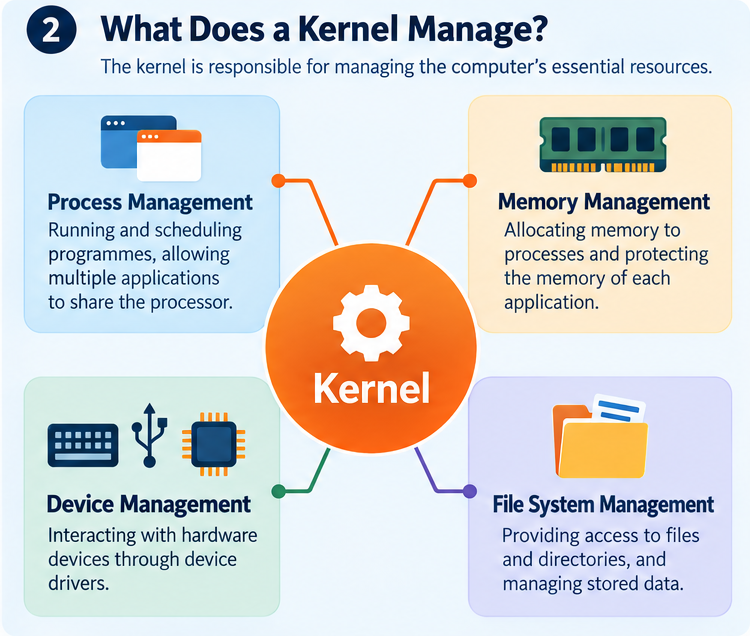
Although kernels vary between operating systems, most provide several fundamental services. Their main responsibilities can be grouped into four areas: managing processes, memory, devices and file systems.
Process Management
When several applications are running, they all need time on the processor to execute their instructions. The kernel manages processes, which are running instances of programmes, and coordinates their execution. On a processor with a single execution core, multiple processes can make progress by taking turns. On systems with multiple cores, some processes can also execute at the same time. The kernel helps decide which work should run and when, allowing applications to share the available processing resources.
This is what makes it possible to listen to music while browsing the web or downloading a file in the background.
Memory Management
Every running application needs memory to store its instructions and data. The kernel manages the system's memory resources and helps make memory available to processes as they need it.
On systems that support memory protection, it also helps keep the memory used by different processes separate. This prevents an application from freely accessing or modifying another application's memory.
For example, a web browser and a text editor can operate independently, each using memory for its own data.
Memory management is therefore essential not only for using the available resources efficiently, but also for maintaining system stability.
Device Management
Computers interact with many different hardware devices, from keyboards and displays to storage drives, network interfaces and sensors.
Each type of device has its own characteristics and communication mechanisms.
The kernel provides a way for applications to use these devices without requiring developers to understand every detail of the hardware. It relies on software components called device drivers, which handle communication with specific hardware devices.
Consider an embedded system that collects temperature measurements from a sensor connected through a serial interface. The application needs the measurements, but it does not necessarily need to know how the serial controller operates internally. The kernel and the appropriate driver provide the mechanisms needed to receive the data.
This separation makes software easier to develop and allows applications to use common interfaces across different hardware platforms.
File System Management
Applications often need to save information or retrieve data stored on a device.
The kernel provides services for accessing files and directories, working with file systems to organise and manage stored information.
For example, when a text editor opens a document, it relies on operating-system services to locate and read the file. When the user saves their changes, those services handle the request to write the updated data. The application does not need to manage the physical storage device directly. By providing common file-access interfaces, the kernel helps applications work with different storage devices and file systems in a consistent way.
Together, these responsibilities make the kernel a central part of how an operating system manages the computer.
How Do Applications Interact with the Kernel?
We have seen that the kernel manages resources and provides essential services. But how can an application use those services?
In many modern operating systems, applications and the kernel run in separate execution environments known as user space and kernel space.
User space is where ordinary applications execute, with restrictions on which system resources they can access directly.
Kernel space is where the kernel runs with the privileges required to manage hardware and essential system operations.
This separation helps protect the operating system by limiting what applications can do independently.
When an application needs a service provided by the kernel, it can make a request through an interface called a system call.
A system call allows an application to request an operation, such as reading a file, creating a process or communicating with a device, without directly controlling the underlying resource.
For example, imagine an application on an embedded Linux device that needs to read temperature measurements. The application requests data through an operating-system interface. The kernel works with the appropriate driver to handle the request and make the received data available to the application. The application can then process the measurements without having to manage the communication hardware itself.
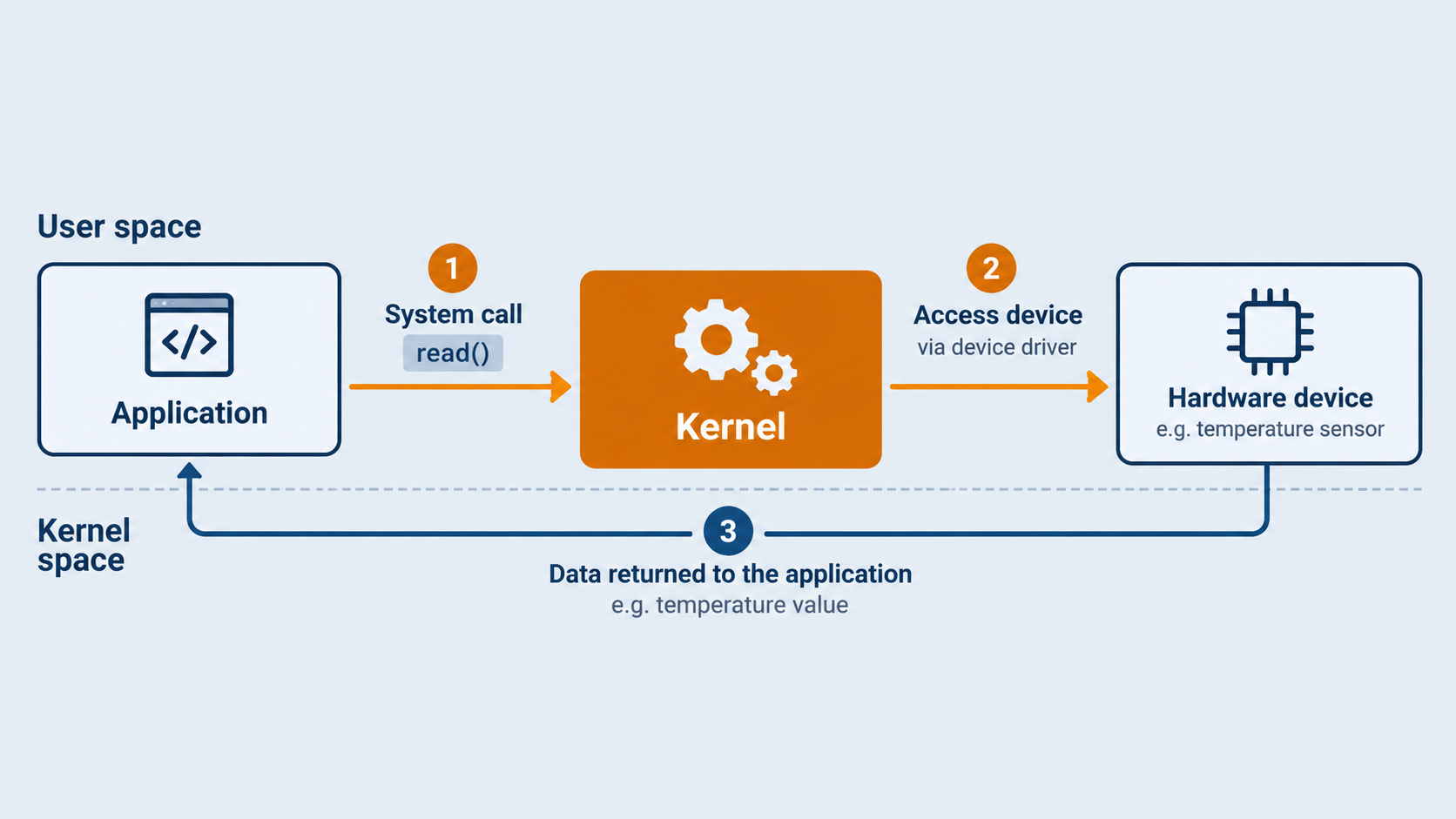
This relationship is fundamental to modern operating systems: applications request services, while the kernel manages the resources needed to provide them.
The Linux Kernel: A Real-World Example
One of the most widely used examples of a kernel is Linux.
Linux is an open-source kernel that provides the essential services required by a wide variety of computing systems.
Like the kernels described throughout this article, it manages processes, memory, hardware devices and file systems. Applications rely on these services to execute and interact with the underlying hardware.
An important distinction is that the Linux kernel is not a complete operating system on its own.
A complete Linux-based system combines the kernel with other software components, such as libraries, system utilities, services and applications.
This flexibility allows Linux to serve as the foundation for very different systems, including desktop computers, servers, networking equipment and embedded devices.
In embedded systems, the Linux kernel provides an important connection between applications and the hardware platform. It manages essential resources and supports communication with peripherals such as sensors, storage devices and network interfaces.
Whether Linux is running on a powerful server or a small embedded board, the fundamental role of its kernel remains the same: managing resources and providing the services that software needs to operate.
For readers interested in how Linux emerged and developed, our article From Unix to Linux explores its origins and relationship with the Unix tradition.
Conclusion
The kernel is a fundamental component of an operating system. It manages system resources, coordinates the execution of applications and provides controlled access to hardware.
By handling these responsibilities, it allows applications to work without managing every aspect of the computer themselves.
Although different operating systems may use different kernel designs, the underlying purpose remains largely the same: providing a reliable foundation on which applications and system services can operate.
Understanding the kernel is therefore an important step towards understanding how software and hardware work together.
Sources and Further Reading
- Remzi H. Arpaci-Dusseau and Andrea C. Arpaci-Dusseau, Operating Systems: Three Easy Pieces.
- Linux Kernel Organization, About Linux Kernel.
- Linux Kernel Documentation, The Linux Kernel Documentation.